
AI 영상 광고 기획서는 광고 한 편을 컷 단위로 설계해 Seedance 2.5에 넣을 영어 프롬프트로 바꿔 주는 HTML 파일입니다. 아래 코드 전문을 복사해 .html 파일로 저장하고 브라우저로 열면 바로 씁니다. 기획서를 쓰는 데는 설치나 가입이 필요 없고, 영상을 생성할 때만 Higgsfield 계정이 필요합니다.
매장, 제품, 장소 하나를 15초 안팎의 실사풍 영상 광고로 만들려는 사람이 대상입니다. 2026년 10월 17일 Windows의 Chrome에서 이 파일을 열어 6쪽이 모두 표시되는 것을 확인했고, macOS 브라우저에서는 확인하지 않았습니다. 이 기획서를 소개한 성공지식백과 유튜브 영상은 Higgsfield의 유료 협찬으로 제작했습니다.
기획서 HTML 파일로 저장하기
기획서는 파일 하나에 화면, 예시, 프롬프트 생성 코드가 모두 들어 있습니다. 코드 블록 오른쪽 위의 복사 버튼을 누르면 줄이 접혀 있어도 전체가 복사됩니다.
전체 코드 복사하기
아래 ai-video-ad-planning-sheet.html 블록의 복사 버튼을 누릅니다.
텍스트 파일로 붙여 넣기
메모장 같은 텍스트 편집기를 열고 붙여 넣습니다. 워드프로세서는 서식이 섞이므로 쓰지 않습니다.
.html로 저장하기
파일 이름을 ai-video-ad-planning-sheet.html로 정하고 인코딩을 UTF-8로 골라 저장합니다. 메모장에서는 파일 형식을 '모든 파일'로 바꿔야 .txt가 붙지 않습니다.
브라우저로 열기
저장한 파일을 Chrome이나 Edge로 엽니다. 위쪽 도구 막대와 A4 6쪽이 보이면 준비가 끝납니다.
<!doctype html>
<html lang="ko">
<head>
<meta charset="utf-8">
<meta name="viewport" content="width=device-width, initial-scale=1">
<title>AI 영상 광고 기획서 양식 · Seedance 2.5 프롬프트</title>
<link rel="preconnect" href="https://fonts.googleapis.com">
<link rel="preconnect" href="https://fonts.gstatic.com" crossorigin>
<link href="https://fonts.googleapis.com/css2?family=Nanum+Pen+Script&display=swap" rel="stylesheet">
<style>
:root {
--ink: #222; --muted: #6b7280; --rule: #c9ced6; --line: #dfe3e8;
--pen: #1d4fb8; --bad: #d6453d;
--blue: #2f6fdb; --red: #d6453d; --yel: #c58a12; --ai: #7b61c9; --cam: #1b9e8f; --gray: #9aa1aa;
--lh: 9.2mm;
}
* { box-sizing: border-box; }
body {
margin: 0; background: #d9dce1; color: var(--ink);
font-family: "Pretendard", "Apple SD Gothic Neo", "Malgun Gothic", "Noto Sans KR", system-ui, sans-serif;
word-break: keep-all;
}
/* 화면 위 도구 막대 (인쇄 안 됨) */
.toolbar {
position: sticky; top: 0; z-index: 10; background: #23262b; color: #fff;
display: flex; gap: .5rem; align-items: center; flex-wrap: wrap; padding: .6rem 1rem;
font-size: 14px;
}
.toolbar b { margin-right: .5rem; }
.toolbar .sep { width: 1px; height: 22px; background: #4a4f57; margin: 0 .3rem; }
.toolbar button {
border: 1px solid #4a4f57; background: #2f333a; color: #fff; border-radius: 8px;
padding: .38rem .8rem; font: inherit; cursor: pointer;
}
.toolbar button.on { background: #fff; color: #23262b; border-color: #fff; font-weight: 700; }
.toolbar button.copy { background: #2f6fdb; border-color: #2f6fdb; }
.toolbar button.copy.done { background: #2f9e44; border-color: #2f9e44; }
.toolbar button.copy.warn { background: #d6453d; border-color: #d6453d; }
.toolbar .grow { flex: 1; }
.toolbar .msg { color: #b8bec7; font-size: 12px; }
/* A4 종이 */
.page {
width: 210mm; min-height: 297mm; margin: 10mm auto; background: #fff;
padding: 14mm 15mm 12mm; position: relative;
box-shadow: 0 2px 10px rgba(0,0,0,.18);
display: flex; flex-direction: column;
}
.top { display: flex; justify-content: space-between; align-items: flex-end; font-size: 9pt; color: var(--muted); }
.top .doc { letter-spacing: .08em; }
.top .exbadge { color: #fff; font-weight: 700; padding: .6mm 2.4mm; border-radius: 1mm; letter-spacing: 0; }
@keyframes swap { from { opacity: .15; transform: translateY(2mm); } to { opacity: 1; transform: none; } }
#paper.swap .page { animation: swap .45s ease-out; }
@media print { .top .exbadge { color: #222; background: none !important; padding: 0; } }
.titlebar { display: flex; align-items: flex-end; justify-content: space-between; border-bottom: 2.2px solid var(--ink); padding: 2mm 0 2.5mm; margin-bottom: 4mm; }
.titlebar h1 { margin: 0; font-size: 19pt; letter-spacing: -0.02em; }
.titlebar h1 .st { display: inline-block; font-size: 10pt; font-weight: 700; color: #fff; background: var(--ink); border-radius: 4px; padding: .5mm 2.2mm; margin-right: 2.5mm; vertical-align: 3pt; }
.titlebar .meta { font-size: 9pt; color: var(--muted); text-align: right; line-height: 1.6; }
.titlebar .meta span { display: inline-block; min-width: 38mm; border-bottom: 1px solid var(--rule); text-align: left; padding-left: 1.5mm; }
.titlebar .meta .w { font-family: "Nanum Pen Script", cursive; font-size: 15pt; color: var(--pen); line-height: 1; }
.lead { font-size: 9.5pt; color: #444; margin: 0 0 4mm; line-height: 1.6; }
.sec { margin-bottom: 4.5mm; }
.sec h2 {
font-size: 10.5pt; margin: 0 0 1.6mm; display: flex; align-items: center; gap: 2mm;
}
.sec h2::before { content: ""; width: 3.2mm; height: 3.2mm; border-radius: 1mm; background: var(--c); }
.sec h2 small { font-weight: 400; color: var(--muted); font-size: 8.5pt; }
.k-me { --c: var(--blue); } .k-rule { --c: var(--red); } .k-idea { --c: var(--yel); }
.k-ai { --c: var(--ai); } .k-cam { --c: var(--cam); } .k-fixed { --c: var(--gray); }
table.form { width: 100%; border-collapse: collapse; border: 1.4px solid var(--ink); }
table.form th, table.form td { border: 1px solid #9aa1aa; vertical-align: top; }
table.form th {
width: 38mm; background: #f4f5f7; text-align: left; padding: 2.2mm 2.6mm; font-size: 9.5pt; font-weight: 700;
border-left: 2.2mm solid var(--c);
}
table.form th .hint { display: block; font-weight: 400; color: var(--muted); font-size: 7.6pt; margin-top: 1mm; line-height: 1.45; }
table.form td { padding: 0 3mm; }
.write {
font-family: "Nanum Pen Script", "Gaegu", cursive; color: var(--pen);
font-size: 17pt; line-height: var(--lh); white-space: pre-wrap; outline: none;
background-image: repeating-linear-gradient(to bottom, transparent 0, transparent calc(var(--lh) - 1px), var(--line) calc(var(--lh) - 1px), var(--line) var(--lh));
background-position: 0 1px;
}
body.mine .write[contenteditable="true"]:focus { background-color: #f7faff; }
.write:empty::before { content: attr(data-ph); color: #c3c8cf; font-family: "Pretendard", "Malgun Gothic", sans-serif; font-size: 8.5pt; }
/* 고르는 칸 (비율 · 카메라) */
.pick {
font-family: "Nanum Pen Script", cursive; color: var(--pen); font-size: 16pt; line-height: 1.15;
min-height: 8mm; padding: 1mm 0; display: flex; align-items: center;
}
.pick select {
font: inherit; color: inherit; border: none; border-bottom: 1px dashed var(--rule); background: transparent;
width: 100%; padding: 0; cursor: pointer; outline: none;
}
.pick select:focus { background: #f7faff; }
.pick .empty { color: #c3c8cf; font-family: "Pretendard", "Malgun Gothic", sans-serif; font-size: 8.5pt; }
/* 컷 카드 */
.cut { border: 1.4px solid var(--ink); margin-bottom: 4mm; }
.cut-h {
display: flex; justify-content: space-between; align-items: center;
background: #f4f5f7; border-bottom: 1px solid #9aa1aa; padding: 1.4mm 3mm; border-left: 2.2mm solid var(--cam);
font-size: 10pt; font-weight: 700;
}
.cut-h .time { font-weight: 400; color: var(--muted); font-size: 9pt; }
.cut-h .sec-pick { display: inline-flex; align-items: center; gap: 1mm; font-weight: 400; font-size: 9pt; color: var(--muted); }
.cut-h .sec-pick .pick { font-size: 14pt; min-height: 0; padding: 0; width: 12mm; }
.cam-row { display: grid; grid-template-columns: 1fr 1.25fr 1.25fr 1.25fr; border-bottom: 1px solid #9aa1aa; }
.cam-row > div { padding: 1.2mm 2.4mm; border-right: 1px solid #c9ced6; }
.cam-row > div:last-child { border-right: none; }
.cam-row .lab { font-size: 7.6pt; color: var(--muted); }
.cam-row .pick { font-size: 15pt; }
.cam-row > div.dup { background: #fdeceb; }
.cam-row > div.dup .lab { color: var(--bad); font-weight: 700; }
.cut-body { display: grid; grid-template-columns: 30mm 1fr; }
.cut-body > .lab { font-size: 8.4pt; font-weight: 700; padding: 2mm 2.4mm; border-right: 1px solid #c9ced6; background: #fafbfc; }
.cut-body > .lab .hint { display: block; font-weight: 400; color: var(--muted); font-size: 7.4pt; margin-top: .6mm; line-height: 1.4; }
.cut-body > .write { padding: 0 3mm; }
.cut-body + .cut-body { border-top: 1px solid #c9ced6; }
.dupnote { font-size: 8.4pt; color: var(--bad); margin: -1.5mm 0 3mm; min-height: 1em; }
/* 양식에 인쇄된 요청 (고정 문구) */
.fixed { border: 1.4px solid var(--ink); padding: 2.5mm 3.5mm; font-size: 9pt; line-height: 1.65; }
.fixed ol, .fixed ul { margin: 0; padding-left: 5mm; }
.fixed li { margin: .6mm 0; }
.fixed .box { display: inline-block; width: 3.2mm; height: 3.2mm; border: 1.2px solid var(--ink); border-radius: .6mm; margin-right: 1.5mm; vertical-align: -0.4mm; position: relative; }
.fixed .box::after { content: "✓"; position: absolute; left: .2mm; top: -1.6mm; font-size: 9pt; color: var(--pen); font-weight: 700; }
.fixed .ref { color: var(--pen); font-family: "Nanum Pen Script", cursive; font-size: 12.5pt; }
.fixed .sub { color: var(--muted); }
.foot { margin-top: auto; padding-top: 3mm; display: flex; justify-content: space-between; font-size: 8pt; color: var(--muted); border-top: 1px solid var(--line); }
@media print {
body { background: #fff; }
.toolbar { display: none; }
.page { margin: 0; box-shadow: none; page-break-after: always; break-after: page; }
.write:empty::before { color: #d5d9de; }
.pick select { border-bottom-color: transparent; -webkit-appearance: none; appearance: none; }
}
@page { size: A4; margin: 0; }
</style>
</head>
<body class="ex">
<div class="toolbar">
<b>AI 영상 광고 기획서</b>
<span id="topics"></span>
<button id="m-mine">빈 양식에 쓰기</button>
<span class="sep"></span>
<button class="copy" data-step="hero">1단계 주인공 사진</button>
<button class="copy" data-step="place">1단계 장소 사진</button>
<button class="copy" data-step="video">2단계 영상 프롬프트</button>
<button class="copy" data-step="multi">3단계 변형</button>
<span class="grow"></span>
<span class="msg" id="msg"></span>
<button id="dl">AI에게 보낼 HTML 저장</button>
<button id="print">인쇄 · PDF</button>
</div>
<div id="paper"></div>
<script>
// ── 카메라 말 ──────────────────────────────────────────
// 칸에는 한국어, 프롬프트에는 영어가 들어간다.
const CAM = {
size: [
['익스트림 와이드', 'extreme wide shot'],
['와이드', 'wide shot'],
['풀샷', 'full shot showing the whole subject'],
['미디엄', 'medium shot'],
['미디엄 클로즈업', 'medium close-up'],
['클로즈업', 'close-up'],
['익스트림 클로즈업', 'extreme close-up macro shot']
],
angle: [
['드론 부감', 'high aerial drone view looking down at an angle'],
['탑뷰 (바로 위)', 'top-down overhead view from directly above'],
['하이앵글', 'high angle looking down'],
['눈높이 정면', 'eye-level frontal view'],
['눈높이 3/4', 'eye-level front three-quarter view'],
['측면', 'side profile view'],
['뒤에서 3/4', 'rear three-quarter view from behind'],
['로우앵글', 'low angle looking up'],
['지면 높이', 'camera just above the ground surface'],
['웜즈아이 (바로 아래)', "worm's-eye view looking straight up from below"],
['1인칭 시점', 'first-person point of view'],
['어깨 너머', 'over-the-shoulder view']
],
move: [
['고정', 'locked-off camera with no movement'],
['천천히 다가감', 'slow dolly-in toward the subject'],
['천천히 물러남', 'slow dolly-out away from the subject'],
['옆으로 따라감', 'lateral tracking shot moving alongside the subject at the same speed'],
['뒤에서 따라감', 'follow shot from behind at a constant distance'],
['주위를 돎', 'slow orbit around the subject'],
['위로 틸트', 'tilt up following the subject'],
['아래로 틸트', 'tilt down'],
['좌우 팬', 'smooth horizontal pan'],
['솟아오름', 'crane up, rising vertically'],
['내려옴', 'crane down, descending vertically'],
['드론 전진 비행', 'drone flying forward and slightly descending'],
['손으로 든 듯', 'handheld camera with light natural shake'],
['천천히 줌인', 'slow optical zoom-in'],
['초점 이동', 'static camera with a rack focus from foreground to subject']
],
trans: [
['검은 화면에서 시작', 'fade in from black'],
['하드 컷', 'hard cut'],
['동작 이어 컷', 'cut on action: the motion from the previous shot continues across the cut'],
['모양 맞춰 컷', 'match cut: the main shape sits in the same screen position as the end of the previous shot'],
['휩 팬', 'whip-pan transition with a short motion-blur streak'],
['가림 전환', 'foreground wipe: something passes right in front of the lens and reveals the new shot'],
['빛 번쩍', 'flash cut through a brief bright light burst'],
['소리에 맞춰 컷', 'hard cut timed exactly to a sound beat'],
['스냅 줌인', 'snap zoom punch-in'],
['흐림에서 초점', 'starts fully out of focus and pulls into sharp focus'],
['디졸브', 'short cross-dissolve'],
['틈 통과', 'the camera passes through a gap or opening into the new shot']
],
ratio: [['16:9', '16:9 horizontal'], ['9:16', '9:16 vertical'], ['1:1', '1:1 square'], ['4:3', '4:3'], ['3:4', '3:4 vertical'], ['21:9', '21:9 widescreen']],
sec: [2, 3, 4, 5, 6, 8].map(n => [String(n), String(n)])
};
const camEn = (kind, ko) => (CAM[kind].find(o => o[0] === ko) || [ko, ko])[1];
// ── 칸 ─────────────────────────────────────────────────
// lines: 양식에 그려 둘 줄 수. pick: 고르는 칸.
const F = {
subject: { label: '광고할 것', hint: '매장 · 장소 · 제품 이름과 한 줄 설명', lines: 2 },
promise: { label: '한 줄 약속', hint: '보고 나서 기억할 한 가지', lines: 1 },
audience: { label: '보는 사람', hint: '누가 보나', lines: 1 },
mood: { label: '분위기', hint: '느낌 · 피할 느낌', lines: 2 },
ratio: { label: '화면 비율', hint: '쇼츠·릴스는 9:16', pick: 'ratio' },
rules: { label: '꼭 지킬 것', hint: '넣지 않을 것 · 바뀌면 안 되는 것', lines: 3 },
hero: { label: '주인공 생김새', hint: '제품·대표 메뉴·건물. 모양 · 색 · 재질', lines: 2 },
place: { label: '장소', hint: '매장 안 · 거리 · 자연. 보이는 것 두세 개', lines: 2 },
light: { label: '빛 · 색', hint: '주광 하나 + 보조광 하나', lines: 2 },
sound: { label: '소리', hint: '말소리 · 효과음 · 음악', lines: 3 },
endframe: { label: '마지막 정지 화면', hint: '로고·문구 넣을 빈자리', lines: 2 },
keep: { label: '컷이 바뀌어도 그대로', hint: '모양 · 색 · 위치 · 빛 방향', lines: 2 },
change: { label: '바꿀 것', hint: '하나만. 나머지는 그대로', lines: 2 },
hook: { label: '새 훅', hint: 'Change Hook 칸에 적을 첫마디', lines: 1 },
cta: { label: '새 CTA', hint: 'Change CTA 칸에 적을 끝마디', lines: 1 }
};
const CUTS = 6;
const CUT_KEYS = ['size', 'angle', 'move', 'trans', 'sec', 'what', 'end'];
// ── 주제 예시 ──────────────────────────────────────────
// ko: 양식에 손글씨로 보이는 글, en: 예시 프롬프트에 들어가는 영어.
const TOPICS = [
{ id: 'tunnel', name: '터널 벽 타는 차', title: '터널 벽 타는 차 광고', color: '#2f6fdb',
f: {
subject: { ko: '새 로드스터 — 벽을 타고 공중제비 도는 2인승 전기 스포츠카', en: 'a new two-seat electric roadster that can ride a tunnel wall and flip through the air on cold-gas thrusters' },
promise: { ko: '막힌 터널에서도 기다리지 않는다', en: 'even in a blocked tunnel, it never waits' },
audience: { ko: '새 차 소식을 챙겨 보는 자동차 팬', en: 'car enthusiasts who follow new launches' },
mood: { ko: '실제로 찍은 시험 영상처럼 사실적인 긴장감.\n과한 SF 느낌은 빼고.', en: 'tense and realistic, like real test footage, never over-the-top science fiction' },
ratio: { ko: '16:9' },
rules: { ko: '로고 · 엠블럼 · 글자 · 자막을 넣지 않는다. 표지판은 기호만.\n분사는 불꽃이 아니라 흰 냉가스.\n모든 컷에 같은 차 한 대. 다른 흰 스포츠카는 없다.',
en: 'No logos, badges, text, or subtitles; signs carry only symbols.\nThe thrusters release only white cold gas, never fire.\nThe same single car in every shot; no other white sports car.' },
hero: { ko: '낮고 각진 쐐기 모양 2인승. 흰 차체에 아래쪽은 검정,\n어두운 유리 캐노피, 뒤쪽 빨간 가로 라이트바, 차 밑 분사구.', en: 'a low, sharply angular white wedge two-seat electric car with black lower sides, a dark glass canopy, a full-width red tail-light bar, flat black wheel covers, and thrust nozzles under the body' },
place: { ko: '인제양양터널 안. 2차로 일방통행, 오른쪽 차로는 공사로 막힘\n(드럼 · 콘 · 노란 화살표판), 왼쪽 차로에 대기 줄, 휘어진 왼쪽 벽.', en: 'inside the real Inje-Yangyang Tunnel in South Korea: a two-lane one-way tube; the right lane is closed for maintenance with drums, cones, and a flashing yellow arrow board; a queue of cars waits in the left lane beside the curved left wall' },
light: { ko: '천장의 흰 LED 줄이 주광.\n공사 화살표판의 노란 깜빡임이 보조광.', en: 'the continuous white LED strip along the tunnel ceiling as the main light, with the flashing yellow arrow board as the only accent' },
sound: { ko: '말소리 없음. 터널 울림 · 환풍기 → 팬이 차오르는 소리 →\n벽을 타는 내내 부스터 쉬익 → 박차는 고압 분사 → 착지 구름 → 바깥 산바람.\n음악 없음.',
en: 'No dialogue, no music. Tunnel hum and ventilation fans; a rising fan whir; a continuous booster hiss echoing while it rides the wall; a loud high-pressure blast on the kick-off; a heavy whoosh on landing; then open mountain wind outside.' },
endframe: { ko: '터널 밖에서 본 출구. 숲 덮인 산 아래 터널 입구,\n차가 지나간 뒤 흰 가스가 남아 흘러나온다. 위쪽 1/3은 하늘.', en: 'the exit portal set into a forested mountain, seen from outside, with the last white vapor drifting out after the car has passed; the upper third is clean sky for a title added later' },
keep: { ko: '차 모양 · 흰 차체와 검은 아래쪽, 대기 줄은 왼쪽 차로 · 공사 구역은 오른쪽,\n차는 왼쪽 벽을 탄다, 진행 방향은 항상 출구 쪽', en: "the car's shape, white body and black lower sides; the queue in the left lane and the work zone in the right lane; the car rides the left wall; every car always travels toward the exit" },
change: { ko: '차 색만 무광 검정으로. 카메라 · 컷 · 소리는 그대로.', en: "Change only the car's white body panels to matte black; the lower sides stay black." },
hook: { ko: '터널이 막혀도 기다리지 않는다' },
cta: { ko: '지금 예약하기' }
},
cuts: [
{ size: '와이드', angle: '눈높이 정면', move: '천천히 다가감', trans: '검은 화면에서 시작', sec: '3',
what: { ko: '대기 줄 뒤에서 터널 안을 본다. 흰 차가 줄 세 번째,\n오른쪽 공사 구역 앞에서 작업자가 빨간 경광봉을 든다.', en: 'Behind the queue, looking down the tunnel: the white car waits third in line in the left lane while a worker in a reflective vest raises a red light baton in front of the closed right lane.' },
end: { ko: '작업자가 경광봉을 든 채 멈춘다', en: 'the worker holds the baton up' } },
{ size: '익스트림 클로즈업', angle: '지면 높이', move: '초점 이동', trans: '하드 컷', sec: '3',
what: { ko: '차 왼쪽 앞바퀴와 문턱 아래 팬. 팬이 돌기 시작하고\n오른쪽 부스터가 흰 가스를 뿜으며 차를 벽 쪽으로 민다.', en: 'The left front wheel and the fan vents under the sill: the vents spin up, then the boosters on the right side blast white cold gas toward the tunnel center and shove the car sideways toward the wall.' },
end: { ko: '앞바퀴가 휘어진 벽 아래에 닿는다', en: 'the left front wheel touches the base of the curved wall' } },
{ size: '풀샷', angle: '뒤에서 3/4', move: '뒤에서 따라감', trans: '동작 이어 컷', sec: '3',
what: { ko: '차가 왼쪽 벽을 타고 대기 줄 위로 달린다. 부스터가 쉬지 않고\n벽 반대쪽으로 분사하고 긴 흰 가스 꼬리가 남는다.', en: 'The car drives up the curved left wall and races forward along it above the queued cars, body tilted about seventy degrees; its boosters keep blasting toward the tunnel center the whole way, leaving a long white vapor trail.' },
end: { ko: '공사 구역 끝에서 아직 벽 위에 있다', en: 'it reaches the end of the work zone, still on the wall' } },
{ size: '미디엄', angle: '측면', move: '좌우 팬', trans: '휩 팬', sec: '3',
what: { ko: '벽에서 고압 분사로 튕겨 나와 터널 한가운데서 옆으로 한 바퀴.\n뒤집혔을 때 분사가 천장을 향하고, 흰 구름 속에 네 바퀴로 착지.', en: 'A violent cold-gas blast kicks the car off the wall into the middle of the tunnel, where it makes exactly one barrel roll around its long axis, jets shooting at the ceiling while upside down, then lands on all four wheels inside a dense white cloud.' },
end: { ko: '구름 밖으로 수평으로 달려 나온다', en: 'the car drives out of the cloud, level' } },
{ size: '와이드', angle: '로우앵글', move: '고정', trans: '빛 번쩍', sec: '3',
what: { ko: '출구 밖 도로 높이에서 터널 입구를 본다.\n차가 어두운 입구에서 카메라 쪽으로 나와 왼쪽으로 지나간다.', en: 'Outside the exit portal at road level, looking back into the dark tunnel mouth: the white car comes out toward the camera, grows larger, and passes on the left of frame into daylight.' },
end: { ko: '입구에서 흰 가스만 흘러나온다', en: 'only white vapor drifts out of the portal' } }
] },
{ id: 'bakery', name: '대전 빵집', title: '대전 빵집 광고', color: '#c58a12',
f: {
subject: { ko: '대전의 오래된 유명 빵집 — 튀김소보로 · 보문산메아리 · 판타롱부추빵', en: 'a famous old bakery in Daejeon, South Korea, known for its Twigim Soboro, Bomunsan Meari, and Pantalong Buchu bread' },
promise: { ko: '갓 튀긴 빵 냄새가 화면 밖으로 나온다', en: 'you can almost smell the bread fresh out of the fryer' },
audience: { ko: '대전 여행을 계획하는 사람, 빵 좋아하는 사람', en: 'people planning a trip to Daejeon and bread lovers' },
mood: { ko: '따뜻하고 북적이는 아침 빵집. 손으로 만든 느낌.\n차갑고 깔끔한 광고 느낌은 빼고.', en: 'a warm, busy morning bakery with a handmade feel, never cold or sterile' },
ratio: { ko: '16:9' },
rules: { ko: '가게 이름 · 간판 · 로고 · 가격표 글자를 넣지 않는다.\n빵 모양과 속은 사진과 똑같이.\n직원은 흰 제빵복과 흰 모자.',
en: 'No shop name, signs, logos, or readable price cards anywhere.\nEach bread keeps exactly the shape and filling of its reference.\nStaff wear white bakery uniforms and white caps.' },
hero: { ko: '튀김소보로: 지름 9 cm 둥근 튀김빵, 울퉁불퉁 소보로 겉, 속은 팥.\n보문산메아리: 높은 돔 모양 결 빵, 반짝이는 캐러멜색 나선 겉.\n판타롱부추빵: 반짝이는 둥근 빵, 속은 부추와 달걀.', en: 'three breads: Twigim Soboro, a round deep-golden fried bun about 9 cm across with a bumpy streusel crust and dark red-bean paste inside; Bomunsan Meari, a tall dome-shaped laminated pastry with a glossy caramel spiral crust and dozens of thin layers; Pantalong Buchu bread, a shiny round bun packed with green garlic chives and scrambled egg' },
place: { ko: '대전 빵집 매장. 가운데 긴 나무 진열대에 빵이 가득,\n왼쪽 유리벽 너머 튀김기가 있는 주방, 손님들이 집게와 쟁반을 든다.', en: 'the sales floor of a busy old bakery in Daejeon: long dark wooden display tables full of breads down the middle, an open kitchen with a fryer behind a glass wall on the left, customers holding tongs and trays' },
light: { ko: '천장의 따뜻한 스포트라이트가 주광.\n주방 쪽 하얀 빛이 보조광.', en: 'warm tungsten spotlights over the tables as the main light, with cooler white light from the kitchen as fill' },
sound: { ko: '말소리 없음. 지글지글 기름 → 뜰채 소리 → 빵 껍질 부서지는 소리 →\n북적이는 매장 · 집게 딸깍 → 칼이 결을 자르는 바삭 소리.\n잔잔한 어쿠스틱 기타.',
en: 'No dialogue. Sizzling oil; a metal strainer on the fryer; crust cracking; the murmur of a busy bakery and tongs clicking; a knife crunching through flaky layers; a soft warm acoustic guitar melody.' },
endframe: { ko: '어두운 나무 테이블에 튀소 · 부추빵 · 메아리 세 개를 나란히.\n위쪽 1/3은 문구 넣을 자리로 흐리게 비워 둔다.', en: 'the three breads in a row on a dark wooden table, halved Twigim Soboro on the left, torn Pantalong Buchu bread in the center, sliced Bomunsan Meari on the right, steam rising; the upper third is soft and empty for a title' },
keep: { ko: '빵 세 가지의 모양 · 색 · 속, 따뜻한 조명 색,\n주방은 왼쪽 · 진열대는 가운데', en: 'the shape, color, and filling of the three breads; the warm light color; the kitchen on the left and the display tables in the middle' },
change: { ko: '조명만 저녁 매장처럼 조금 더 어둡고 주황빛으로.', en: 'Change only the lighting to a slightly darker, more orange evening look.' },
hook: { ko: '대전 가면 이것부터' },
cta: { ko: '오늘 아침 갓 나온 빵' }
},
cuts: [
{ size: '익스트림 클로즈업', angle: '측면', move: '고정', trans: '검은 화면에서 시작', sec: '3',
what: { ko: '튀김기 기름 속 튀김소보로 하나. 기름 거품이 터지고\n뜰채가 들어와 빵을 건진다.', en: 'One Twigim Soboro floats in bubbling golden fryer oil; tiny bubbles burst around its crust; a metal strainer slides under it and lifts it out.' },
end: { ko: '빵이 기름을 떨구며 올라온다', en: 'the bun rises out of the oil, dripping' } },
{ size: '미디엄', angle: '탑뷰 (바로 위)', move: '옆으로 따라감', trans: '모양 맞춰 컷', sec: '2',
what: { ko: '냉각망 위에 튀소가 줄지어 있다. 장갑 낀 손이\n마지막 빈자리에 갓 튀긴 빵을 놓는다. 김이 오른다.', en: 'Rows of fresh Twigim Soboro on a cooling rack; a gloved hand places the last hot bun into the only empty gap; steam rises from every bun.' },
end: { ko: '줄이 다 찬다', en: 'the grid is complete' } },
{ size: '클로즈업', angle: '눈높이 정면', move: '천천히 다가감', trans: '휩 팬', sec: '3',
what: { ko: '두 손이 튀소를 반으로 가른다. 소보로가 부서지고\n하얀 빵 속에서 진한 팥이 드러나며 김이 오른다.', en: 'Two hands tear a Twigim Soboro in half; the streusel crust cracks and crumbs fall; the soft white bread stretches open to reveal thick dark red-bean paste and a curl of steam.' },
end: { ko: '두 쪽을 벌려 팥이 카메라를 향한다', en: 'the two halves are held apart, the red-bean paste facing camera' } },
{ size: '와이드', angle: '눈높이 3/4', move: '뒤에서 따라감', trans: '가림 전환', sec: '3',
what: { ko: '손님 어깨가 렌즈를 지나간 뒤 매장 통로. 나무 진열대에 빵이 가득,\n손님들이 집게로 빵을 집고 제빵사가 새 쟁반을 높이 들고 들어온다.', en: 'After a customer\'s shoulder crosses the lens, the aisle between the long wooden display tables full of breads; customers pick bread with tongs and a baker carries a fresh tray high above the crowd.' },
end: { ko: '통로 가운데서 멈춘다', en: 'the camera settles in the middle of the aisle' } },
{ size: '미디엄 클로즈업', angle: '로우앵글', move: '주위를 돎', trans: '소리에 맞춰 컷', sec: '2',
what: { ko: '나무 도마 위 보문산메아리. 긴 빵칼이 내려가며 겉이 부서지고\n수십 겹 나선 결이 드러난다.', en: 'A whole Bomunsan Meari on a wooden board; a long bread knife slices down through it; the glossy crust crackles and the cut face shows dozens of thin spiral layers.' },
end: { ko: '자른 단면을 정면으로 본다', en: 'the camera stops facing the cut layers' } },
{ size: '미디엄', angle: '하이앵글', move: '솟아오름', trans: '디졸브', sec: '2',
what: { ko: '어두운 나무 테이블에 갈라진 튀소, 속이 넘치는 부추빵,\n자른 메아리가 나란히. 김이 오른다.', en: 'On a dark wooden table, a halved Twigim Soboro, a torn-open Pantalong Buchu bread spilling green chive filling, and a sliced Bomunsan Meari sit in a row, steam rising.' },
end: { ko: '모든 움직임이 멈춘다', en: 'all motion resolves' } }
] },
{ id: 'fashion', name: '옷 쇼핑몰', title: '옷 쇼핑몰 신상 광고', color: '#7b61c9',
f: {
subject: { ko: '작은 온라인 옷 쇼핑몰의 가을 신상 — 카멜 코트 · 크림 니트 · 연청 와이드 데님', en: "a small Korean online clothing store's new autumn line: a camel wool coat, a cream cable-knit sweater, and light-wash wide-leg jeans" },
promise: { ko: '상세페이지 사진 그대로의 옷이 성수동 거리에서 살아 움직인다', en: 'the exact clothes from the product photos come alive on the streets of Seongsu-dong' },
audience: { ko: '가을 코디를 찾는 20~30대', en: 'people in their twenties and thirties looking for autumn outfits' },
mood: { ko: '노을빛 가을 오후, 필름 느낌의 룩북.\n과하게 화려한 패션쇼 느낌은 빼고.', en: 'a golden autumn afternoon lookbook with soft film grain, never a flashy runway show' },
ratio: { ko: '16:9' },
rules: { ko: '옷 색 · 단추 · 니트 무늬는 상품 사진과 똑같이.\n모델은 실존 인물이 아닌 가상 인물, 모든 컷 같은 얼굴.\n로고 · 간판 글자를 넣지 않는다.',
en: 'Each garment keeps exactly the color, buttons, cut, and knit pattern of its product photo.\nThe model is a fictional person, not a real or famous one, with the same face in every shot.\nNo logos, shop names, or readable signs.' },
hero: { ko: '카멜 싱글 울 코트(무릎 길이, 짙은 갈색 단추 3개)를 열어 입고\n크림 케이블 니트, 연청 하이웨이스트 와이드 데님, 흰 운동화.\n모델은 어깨 길이 검은 머리의 20대 중반 여성.', en: 'a fictional Korean woman in her mid-twenties with shoulder-length black hair, wearing a knee-length camel single-breasted wool coat with three dark brown horn buttons worn open over an oversized cream cable-knit sweater, light-wash high-waist wide-leg jeans, and white sneakers' },
place: { ko: '서울 성수동. 붉은 벽돌 상점 골목, 낮은 벽돌 건물이 늘어선 거리,\n붉게 칠한 교차로와 흰 벽.', en: 'Seongsu-dong in Seoul: a narrow street of red-brick storefronts with potted plants, a busy shopping street of low brick buildings, and a small intersection with a red-painted road and a plain white wall' },
light: { ko: '서쪽 낮은 해의 따뜻한 노을빛이 주광.\n벽돌 벽에 반사된 빛이 보조광.', en: 'low warm late-afternoon sun from the west as the main light, with warm light bouncing off the brick walls as fill' },
sound: { ko: '말소리 없음. 잔잔한 로파이 피아노와 비트,\n벽돌 위 발소리, 울 코트 스치는 소리, 먼 거리 소음.',
en: 'No dialogue. Soft lo-fi electric piano and a gentle beat; footsteps on brick; the rustle of wool; distant street murmur.' },
endframe: { ko: '흰 벽 앞, 모델이 코트 주머니에 손을 넣고 화면 오른쪽 1/3에 선다.\n왼쪽 1/3은 문구 넣을 흰 벽으로 비워 둔다.', en: 'the model stands on the right third of frame in front of the plain white wall, hands in her coat pockets, framed from the knees up; the left third is clean white wall for a title added later' },
keep: { ko: '모델 얼굴 · 머리, 세 벌 착장, 해가 비치는 방향,\n다른 행인은 어두운 옷', en: "the model's face and hair, the three-piece outfit, the direction of the sunlight, and other pedestrians in plain dark clothes" },
change: { ko: '코트 색만 차콜 그레이로. 나머지는 그대로.', en: 'Change only the coat color to charcoal grey.' },
hook: { ko: '이번 가을 코디 이거 하나로' },
cta: { ko: '지금 신상 보러 가기' }
},
cuts: [
{ size: '미디엄', angle: '탑뷰 (바로 위)', move: '고정', trans: '검은 화면에서 시작', sec: '2',
what: { ko: '흰 테이블 위 상품 세 벌을 상세페이지처럼 펼쳐 놓았다.\n바람이 불어 카멜 코트가 렌즈 쪽으로 날아오른다.', en: 'The three garments lie flat on a white table like product photos, sweater on the left, jeans in the center, coat on the right; a gust lifts the camel coat up toward the lens.' },
end: { ko: '카멜 울이 화면을 가득 채운다', en: 'the camel wool fills the whole frame' } },
{ size: '풀샷', angle: '로우앵글', move: '천천히 물러남', trans: '모양 맞춰 컷', sec: '3',
what: { ko: '붉은 벽돌 골목. 모델이 세 벌을 입고 카메라 쪽으로 걸어온다.\n코트 자락과 와이드 데님이 흔들린다.', en: 'On the red-brick street, the model wearing all three garments walks straight toward the camera on the sidewalk, storefronts on the left; the open coat hem and wide jeans swing with her stride.' },
end: { ko: '모델이 카메라 오른쪽으로 지나간다', en: 'she passes the camera on the right' } },
{ size: '익스트림 클로즈업', angle: '측면', move: '옆으로 따라감', trans: '휩 팬', sec: '2',
what: { ko: '니트의 굵은 꽈배기 결 → 데님 허리 → 코트 울 결과 짙은 갈색 단추.\n햇빛이 원단 위를 스친다.', en: 'Macro across her outfit: the thick cable knit of the sweater, then the high waistband of the jeans, then the camel wool weave and one dark horn button, sunlight grazing the texture.' },
end: { ko: '단추에서 멈춘다', en: 'the slide stops on the horn button' } },
{ size: '와이드', angle: '눈높이 3/4', move: '좌우 팬', trans: '가림 전환', sec: '3',
what: { ko: '건너편 인도에서 본 성수동 거리. 모델이 맞은편 인도를\n오른쪽에서 왼쪽으로 걷고, 어두운 옷의 행인들 사이에서 눈에 띈다.', en: 'From the opposite sidewalk, across the shopping street: the model walks on the far sidewalk from frame right to frame left among pedestrians in dark clothes, standing out by color.' },
end: { ko: '모델이 화면 가운데에 머문다', en: 'she stays at frame center as the pan follows her' } },
{ size: '풀샷', angle: '지면 높이', move: '위로 틸트', trans: '소리에 맞춰 컷', sec: '2',
what: { ko: '붉은 교차로 바닥에서 흰 운동화부터 올라가 얼굴까지.\n모델이 멈춰 왼쪽 어깨 너머로 뒤돌아본다.', en: 'From just above the red-painted road, the camera tilts up from her white sneakers to her face; she stops and looks back over her left shoulder into the lens.' },
end: { ko: '얼굴이 화면 위쪽에서 카메라를 본다', en: 'her face in the upper third, looking into the lens' } },
{ size: '미디엄', angle: '눈높이 정면', move: '주위를 돎', trans: '디졸브', sec: '3',
what: { ko: '흰 벽 앞, 모델이 코트 주머니에 손을 넣고 선다.\n바람에 코트 자락과 머리카락이 살짝 날린다.', en: 'In front of the plain white wall, she stands with her hands in her coat pockets, framed from the knees up; a light breeze lifts the coat hem and a strand of hair; a small calm smile.' },
end: { ko: '모든 움직임이 멈춘다', en: 'all motion resolves' } }
] }
];
// ── 쪽 구성 ────────────────────────────────────────────
const PAGES = [
{ step: 1, name: '광고 정하기', part: '1/2',
lead: '무엇을 누구에게 보여 줄지만 적습니다. 매장이나 장소 이름과 한 줄 설명이면 시작할 수 있습니다.',
secs: [
{ h: '광고할 것', kind: 'me', keys: ['subject', 'promise', 'audience'] },
{ h: '느낌과 규격', kind: 'idea', keys: ['mood', 'ratio'] },
{ h: '꼭 지킬 것', kind: 'rule', keys: ['rules'] }
] },
{ step: 1, name: '주인공과 장소', part: '2/2',
lead: '영상이 컷마다 모양을 바꾸지 않도록 주인공과 장소를 사진 두 장으로 먼저 고정합니다. 내 매장·제품 사진이 있으면 그 사진을 올리고 이 단계는 건너뜁니다.',
secs: [
{ h: '참조 사진으로 고정할 것', kind: 'me', keys: ['hero', 'place', 'light'] },
{ h: '양식에 들어 있는 요청', note: '그대로 둠', kind: 'fixed', fixed: 'req1' }
] },
{ step: 2, name: '컷 설계', part: '1/2',
lead: '화면 전환을 모델에 맡기지 않습니다. 컷마다 구도(크기·각도), 카메라 움직임, 이 컷으로 넘어오는 전환을 직접 고릅니다. 다른 컷과 하나라도 겹치면 빨갛게 표시됩니다.',
secs: [{ kind: 'cam', cuts: [0, 1, 2] }] },
{ step: 2, name: '컷 설계', part: '2/2',
lead: '쓰지 않는 컷은 비워 두면 빠집니다. 컷 길이를 모두 더한 값이 영상 길이입니다(Seedance 2.5는 4~30초).',
secs: [{ kind: 'cam', cuts: [3, 4, 5] }] },
{ step: 2, name: '소리와 마무리', part: '1/1',
lead: '마지막 정지 화면은 편집에서 문구를 얹을 자리입니다. 컷이 바뀌어도 그대로여야 하는 것을 적어 두면 모양이 덜 흔들립니다.',
secs: [
{ h: '소리', kind: 'me', keys: ['sound'] },
{ h: '마무리', kind: 'me', keys: ['endframe'] },
{ h: '연속성', kind: 'rule', keys: ['keep'] },
{ h: '양식에 들어 있는 요청', note: '그대로 둠', kind: 'fixed', fixed: 'req2' }
] },
{ step: 3, name: '변형 만들기', part: '1/1',
lead: '잘 나온 영상 하나를 Ads Studio의 Ad Multiplier에 넣어 다시 찍지 않고 버전을 늘립니다. 일반 프롬프트와 훅·CTA 바꾸기는 둘 중 하나만 켜집니다.',
secs: [
{ h: '일반 프롬프트로 바꾸기', kind: 'idea', keys: ['change'] },
{ h: '훅 · CTA 바꾸기', note: '해당 칸에 그대로 적기', kind: 'idea', keys: ['hook', 'cta'] },
{ h: '양식에 들어 있는 요청', note: '그대로 둠', kind: 'fixed', fixed: 'req3' }
] }
];
const FIXED = {
req1: `<ul style="list-style:none;padding-left:0">
<li><span class="box"></span>주인공 사진: <span class="ref">주인공 생김새</span>를 단순한 배경에서 앞 3/4로 전체가 보이게. 글자·로고 없이.</li>
<li><span class="box"></span>장소 사진: <span class="ref">장소</span>를 사람·주인공 없이 비어 있게. 같은 <span class="ref">빛 · 색</span>으로.</li>
<li><span class="box"></span>영상에서는 사진 1 = 주인공 모양만, 사진 2 = 장소와 빛만 가져온다.</li>
</ul>`,
req2: `<ul style="list-style:none;padding-left:0">
<li><span class="box"></span>컷마다 구도 · 카메라 움직임 · 전환이 모두 다르다. 앞 컷의 화면을 되풀이하지 않는다.</li>
<li><span class="box"></span>컷 하나에 주된 동작은 하나. 카메라는 적힌 길로만 움직이고 적힌 곳에서 멈춘다.</li>
<li><span class="box"></span>다음 컷은 앞 컷의 <span class="ref">끝 장면</span>에서 이어서 시작한다.</li>
<li><span class="box"></span>적지 않은 컷 · 전환 · 속도 변화 · 흔들림 · 줌을 넣지 않는다. 마지막 12프레임은 멈춘다.</li>
</ul>`,
req3: `<ul style="list-style:none;padding-left:0">
<li><span class="box"></span>원본 영상의 카메라 움직임 · 컷 · 타이밍 · 빛 · 소리는 그대로 둔다.</li>
<li><span class="box"></span>Generate 버튼에 뜨는 크레딧을 확인하고, 480p로 먼저 보고 마음에 들면 높인다.</li>
<li><span class="box"></span>원본과 새 버전을 나란히 놓고 바뀐 것과 그대로인 것을 확인한다.</li>
</ul>`
};
// ── 프롬프트 문장 ──────────────────────────────────────
const lines = t => String(t).split('\n').map(s => s.trim()).filter(Boolean).map(s => s.replace(/^([-•·]|\d+[.)])\s*/, ''));
const oneLine = t => lines(t).join(' ');
const ratioEn = v => camEn('ratio', v.ratio || '16:9');
const cap = s => s.charAt(0).toUpperCase() + s.slice(1);
const BUILD = {
hero: v => [
`Create one ${ratioEn(v)} photorealistic reference photograph of ${oneLine(v.hero)}, for use as the product reference of a video ad for ${oneLine(v.subject)}.`,
'Show the whole subject from an eye-level front three-quarter view, centered, with its full shape, proportions, color, and materials clearly visible. Use a plain seamless neutral studio background and soft even light with a real contact shadow. Show real surface detail: material texture, edges, reflections that follow the light.',
`Rules: ${oneLine(v.rules)}`,
'Only one subject. No props, no people, no text, no logo, no watermark.'
],
place: v => [
`Create one ${ratioEn(v)} photorealistic location photograph of ${oneLine(v.place)}, for use as the location reference of a video ad for ${oneLine(v.subject)}.`,
`Light and color: ${oneLine(v.light)}. Mood: ${oneLine(v.mood)}.`,
'Wide establishing view at eye level with deep focus and a level horizon. The place is empty and ready for the hero to enter: no people, no vehicles or products, no readable signs, no text, no logo, no watermark.'
],
video: (v, cuts) => {
const total = cuts.reduce((s, c) => s + Number(c.sec || 3), 0);
let t = 0;
const shots = cuts.map((c, i) => {
const a = t, b = t + Number(c.sec || 3); t = b;
return [
`${a}–${b}s — SHOT ${i + 1}`,
`In: ${camEn('trans', c.trans)}. Camera: ${camEn('size', c.size)}, ${camEn('angle', c.angle)}; ${camEn('move', c.move)}.`,
`Action: ${oneLine(c.what)}`,
`Ends: ${oneLine(c.end)}.`
].join('\n');
});
return [
'DELIVERY',
`Create a ${total}-second ${ratioEn(v)} photorealistic commercial for ${oneLine(v.subject)}, filmed like a real live-action ad at 24 fps. ${cuts.length} shots, each with exactly the camera and transition written below; do not add, merge, or reorder shots. The ad says one thing: ${oneLine(v.promise)}.`,
'',
'REFERENCES AND LOOK',
`@Image1 = the hero, look only: ${oneLine(v.hero)}. Keep it identical in every shot.`,
`@Image2 = the location, place and light only: ${oneLine(v.place)}. Copy no other object from it.`,
`Light: ${oneLine(v.light)}. Mood: ${oneLine(v.mood)}.`,
'',
shots.join('\n\n'),
'',
`SOUND: ${oneLine(v.sound)}`,
'',
`FINAL FRAME: ${cap(oneLine(v.endframe))}. Hold it completely still for the last 12 frames.`,
'',
'CONTINUITY AND RULES',
`Same in every shot: ${oneLine(v.keep)}.`,
...lines(v.rules),
'Each shot has its own framing, camera move, and transition, one primary action, and starts from the previous end state. The camera stops where written. No unrequested cut, speed ramp, shake, zoom, text, or watermark.'
];
},
multi: v => [
oneLine(v.change),
'Keep every camera move, cut, timing, framing, light, background, and sound from the reference video exactly the same. Do not add or remove anything else.'
]
};
// ── 화면 ───────────────────────────────────────────────
const KEY = 'ad-prompt-sheet-v1';
let mine = {};
try { mine = JSON.parse(localStorage.getItem(KEY) || '{}'); } catch (e) { mine = {}; }
mine.cuts = Array.from({ length: CUTS }, (_, i) => (mine.cuts && mine.cuts[i]) || {});
// ONLY: 예시 하나만 보여 줄 때 그 id (예시 폴더용 사본에서 바꾼다). null이면 전부.
const ONLY = null;
const LIST = ONLY ? TOPICS.filter(t => t.id === ONLY) : TOPICS;
let mode = 'ex', topic = LIST[0];
const save = () => localStorage.setItem(KEY, JSON.stringify(mine));
const esc = s => String(s).replace(/[&<>"]/g, c => ({ '&': '&', '<': '<', '>': '>', '"': '"' }[c]));
const exVal = x => x == null ? '' : (typeof x === 'string' ? x : x.ko || '');
// 양식에 보이는 값
const shown = k => mode === 'ex' ? exVal(topic.f[k]) : (mine[k] || '');
const cutShown = (i, k) => mode === 'ex' ? exVal((topic.cuts[i] || {})[k]) : (mine.cuts[i][k] || '');
// 프롬프트에 들어가는 값 (예시는 영어)
const used = k => mode === 'ex' ? ((topic.f[k] || {}).en || exVal(topic.f[k])) : (mine[k] || '');
const cutUsed = (i, k) => {
if (mode !== 'ex') return mine.cuts[i][k] || '';
const x = (topic.cuts[i] || {})[k];
return x == null ? '' : (typeof x === 'string' ? x : x.en || x.ko || '');
};
function firstLine(t) { return (t || '').split('\n')[0].replace(/\s*—.*$/, '').slice(0, 24); }
function writeCell(k, val, ph, n, attrs) {
return `<div class="write" ${attrs} data-ph="${esc(ph)}" style="min-height:calc(var(--lh) * ${n})" contenteditable="${mode === 'mine'}">${esc(val)}</div>`;
}
function pickCell(kind, val, attrs, ph) {
if (mode !== 'mine') return `<div class="pick">${val ? esc(val) : `<span class="empty">${esc(ph || '')}</span>`}</div>`;
const opts = CAM[kind].map(o => `<option${o[0] === val ? ' selected' : ''}>${esc(o[0])}</option>`).join('');
return `<div class="pick"><select ${attrs}><option value="">${kind === 'sec' ? '3' : '고르기'}</option>${opts}</select></div>`;
}
function cutCard(i) {
const c = k => cutShown(i, k);
const a = k => `data-cut="${i}" data-ck="${k}"`;
return `
<div class="cut" data-i="${i}">
<div class="cut-h"><span>컷 ${i + 1} <span class="time" data-time="${i}"></span></span>
<span class="sec-pick">길이 ${pickCell('sec', c('sec'), a('sec'), '3')}초</span></div>
<div class="cam-row">
<div data-dup="comp-${i}"><div class="lab">샷 크기</div>${pickCell('size', c('size'), a('size'))}</div>
<div data-dup="comp2-${i}"><div class="lab">각도</div>${pickCell('angle', c('angle'), a('angle'))}</div>
<div data-dup="move-${i}"><div class="lab">카메라 움직임</div>${pickCell('move', c('move'), a('move'))}</div>
<div data-dup="trans-${i}"><div class="lab">이 컷으로 넘어오는 전환</div>${pickCell('trans', c('trans'), a('trans'))}</div>
</div>
<div class="cut-body"><div class="lab">화면에 보이는 것<span class="hint">주된 동작은 하나</span></div>
${writeCell('what', c('what'), '무엇이 · 어떻게 움직이나', 2, a('what'))}</div>
<div class="cut-body"><div class="lab">끝 장면<span class="hint">다음 컷이 여기서 시작</span></div>
${writeCell('end', c('end'), '이 컷이 끝날 때의 모습', 1, a('end'))}</div>
</div>`;
}
function render() {
const total = PAGES.length;
document.getElementById('paper').innerHTML = PAGES.map((p, pi) => `
<section class="page">
<div class="top"><span class="doc">AI VIDEO AD PLANNING SHEET</span>${mode === 'ex' ? `<span class="exbadge" style="background:${topic.color}">예시 · ${esc(topic.name)}</span>` : '<span>빈 양식</span>'}<span>Seedance 2.5에 넣을 프롬프트 양식</span></div>
<div class="titlebar">
<h1><span class="st">${p.step}단계</span>${p.name}</h1>
<div class="meta">광고 이름 <span class="w">${esc(mode === 'ex' ? topic.title : firstLine(mine.subject))}</span><br>
쪽 <span style="min-width:12mm">${p.part}</span></div>
</div>
<p class="lead">${p.lead}</p>
${p.secs.map(s => s.cuts ? `${s.cuts.map(cutCard).join('')}<div class="dupnote" data-dupnote="${s.cuts.join(',')}"></div>` : `
<div class="sec k-${s.kind}">
<h2>${s.h}${s.note ? ` <small>— ${s.note}</small>` : ''}</h2>
${s.fixed ? `<div class="fixed">${FIXED[s.fixed]}</div>` : `
<table class="form">${s.keys.map(k => `
<tr><th>${F[k].label}<span class="hint">${F[k].hint}</span></th>
<td>${F[k].pick ? pickCell(F[k].pick, shown(k), `data-k="${k}"`) : writeCell(k, shown(k), F[k].hint, F[k].lines, `data-k="${k}"`)}</td></tr>`).join('')}
</table>`}
</div>`).join('')}
<div class="foot"><span>파랑 = 내 광고 · 빨강 = 꼭 지킬 것 · 노랑 = 바꿔 봐도 됨 · 청록 = 카메라</span><span>— ${pi + 1} / ${total} —</span></div>
</section>`).join('');
if (mode === 'mine') {
document.querySelectorAll('.write[contenteditable="true"]').forEach(el => {
el.addEventListener('input', () => {
const t = el.innerText.replace(/\n$/, '');
if (el.dataset.cut != null) mine.cuts[el.dataset.cut][el.dataset.ck] = t; else mine[el.dataset.k] = t;
save();
if (el.dataset.k === 'subject') document.querySelectorAll('.titlebar .w').forEach(w => { w.textContent = firstLine(mine.subject); });
});
el.addEventListener('paste', e => {
e.preventDefault();
document.execCommand('insertText', false, (e.clipboardData || window.clipboardData).getData('text'));
});
});
document.querySelectorAll('select').forEach(el => el.addEventListener('change', () => {
if (el.dataset.cut != null) mine.cuts[el.dataset.cut][el.dataset.ck] = el.value; else mine[el.dataset.k] = el.value;
save(); refresh();
}));
}
refresh();
}
// 쓰는 컷: 예시는 들어 있는 컷, 빈 양식은 화면 칸을 적은 컷
function activeCuts() {
const out = [];
for (let i = 0; i < CUTS; i++) {
const c = {}; CUT_KEYS.forEach(k => { c[k] = cutUsed(i, k); });
c.i = i;
if (mode === 'ex' ? topic.cuts[i] : (c.what || c.size || c.angle || c.move || c.trans)) out.push(c);
}
return out;
}
// 겹침 검사: 구도(크기+각도) · 움직임 · 전환
function findDupes(cuts) {
const bad = new Set(), notes = [];
const check = (label, keyOf, cells) => {
const seen = {};
cuts.forEach(c => { const k = keyOf(c); if (!k) return; (seen[k] = seen[k] || []).push(c.i); });
Object.entries(seen).forEach(([k, is]) => {
if (is.length < 2) return;
is.forEach(i => cells.forEach(cell => bad.add(`${cell}-${i}`)));
notes.push(`${label} 겹침: 컷 ${is.map(i => i + 1).join(' · ')} (${k.replace('|', ' + ')})`);
});
};
check('구도', c => (c.size && c.angle) ? `${c.size}|${c.angle}` : '', ['comp', 'comp2']);
check('카메라 움직임', c => c.move, ['move']);
check('전환', c => c.trans, ['trans']);
return { bad, notes };
}
function refresh() {
const cuts = activeCuts();
const { bad, notes } = findDupes(cuts);
document.querySelectorAll('[data-dup]').forEach(el => el.classList.toggle('dup', bad.has(el.dataset.dup)));
document.querySelectorAll('[data-dupnote]').forEach(el => {
const ids = el.dataset.dupnote.split(',').map(Number);
el.textContent = notes.filter(n => ids.some(i => n.includes(`컷 `) && n.match(/컷 ([\d · ]+)/)[1].split(' · ').map(Number).includes(i + 1))).join(' ');
});
let t = 0;
document.querySelectorAll('[data-time]').forEach(el => { el.textContent = ''; });
cuts.forEach(c => {
const s = Number(c.sec || 3);
const el = document.querySelector(`[data-time="${c.i}"]`);
if (el) el.textContent = `· ${t}–${t + s}초`;
t += s;
});
const msg = document.getElementById('msg');
const base = mode === 'mine' ? '칸을 눌러 바로 적으세요 · 이 브라우저에 저장됩니다' : `영상 예시: ${topic.name}`;
const lenWarn = cuts.length && (t < 4 || t > 30) ? ` · 길이 ${t}초 (4~30초로 맞추기)` : (cuts.length ? ` · 길이 ${t}초` : '');
msg.textContent = base + lenWarn + (notes.length ? ` · 겹침 ${notes.length}곳` : '');
return { cuts, notes, total: t };
}
function compose(step) {
const v = {};
for (const k of Object.keys(F)) {
const x = String(used(k)).trim();
v[k] = x || `[${F[k].label}]`;
}
const cuts = activeCuts().map(c => {
const o = { ...c };
['size', 'angle', 'move', 'trans'].forEach(k => { if (!o[k]) o[k] = `[컷 ${c.i + 1} ${({ size: '샷 크기', angle: '각도', move: '카메라 움직임', trans: '전환' })[k]}]`; });
if (!o.what) o.what = `[컷 ${c.i + 1} 화면에 보이는 것]`;
if (!o.end) o.end = `[컷 ${c.i + 1} 끝 장면]`;
return o;
});
return BUILD[step](v, cuts).join('\n').replace(/\n{3,}/g, '\n\n').trim();
}
// ── AI에게 보낼 HTML ──────────────────────────────────
// 채운 칸(한국어)과 컷별 카메라 선택(영어 용어 포함), 변환 지시문, 자동 영어 초안을 단독 HTML 한 장으로 만든다.
const AI_BRIEF = [
'You are writing a prompt for the Seedance 2.5 video model from the Korean ad planning sheet below.',
'Translate everything into natural English and write ONE video prompt with these sections in order: DELIVERY, REFERENCES, FIXED MAP, the timed SHOTs, SOUND, RULES.',
'DELIVERY: total length, aspect ratio, photorealistic live-action look, 24 fps, the number of shots, and the sentence "Exactly the cameras and transitions written; do not add, merge, or reorder shots."',
'REFERENCES: one line per reference image (@Image1, @Image2, ...): what it shows and what to copy from it (look only, location only).',
'FIXED MAP: where everything is and which way things face and move, the same in every shot (left/right side, direction of travel, where the light comes from).',
'SHOTs: one block per cut, titled "a–bs — SHOT n", with In (the transition), Camera (position, height, direction it looks, movement), Composition (where the subject sits in frame and which way it faces), Motion (one main action, real-world physics), Ends (the end state the next shot starts from).',
'Keep every cut\'s shot size, angle, camera move, transition, and length exactly as chosen in the sheet; no two shots may share the same framing, move, or transition.',
'SOUND and RULES: from the sheet. Hold the final frame still for the last 12 frames. No text, logos, subtitles, or watermark unless the sheet asks for them.',
'Return only the finished English prompt.'
];
function exportDoc() {
const name = mode === 'ex' ? topic.title : (firstLine(mine.subject) || '내 광고');
const row = (label, val) => `<tr><th>${esc(label)}</th><td>${esc(val || '(비어 있음)').replace(/\n/g, '<br>')}</td></tr>`;
const group = (h, keys) => `<h2>${esc(h)}</h2><table>${keys.map(k => row(F[k].label, shown(k))).join('')}</table>`;
const cuts = activeCuts();
let t = 0;
const cutRows = cuts.map(c => {
const s = Number(c.sec || 3), a = t; t += s;
const ko = k => cutShown(c.i, k);
const cam = (kind, k) => ko(k) ? `${ko(k)} (${camEn(kind, ko(k))})` : '(비어 있음)';
return `<h3>컷 ${c.i + 1} · ${a}–${t}초</h3><table>
${row('샷 크기', cam('size', 'size'))}${row('각도', cam('angle', 'angle'))}
${row('카메라 움직임', cam('move', 'move'))}${row('이 컷으로 넘어오는 전환', cam('trans', 'trans'))}
${row('화면에 보이는 것', ko('what'))}${row('끝 장면', ko('end'))}</table>`;
}).join('');
const drafts = ['video', 'hero', 'place', 'multi'].map(step => `<h3>${({ video: '영상 프롬프트', hero: '주인공 사진 프롬프트', place: '장소 사진 프롬프트', multi: '변형 프롬프트' })[step]}</h3><pre>${esc(compose(step))}</pre>`).join('');
return `<!doctype html>
<html lang="ko"><head><meta charset="utf-8"><meta name="viewport" content="width=device-width, initial-scale=1">
<title>AI 영상 광고 기획서 · ${esc(name)}</title>
<style>
body{font-family:"Pretendard","Apple SD Gothic Neo","Malgun Gothic","Noto Sans KR",system-ui,sans-serif;max-width:820px;margin:32px auto;padding:0 20px;color:#222;line-height:1.6}
h1{font-size:22px;margin:0 0 4px}h2{font-size:17px;margin:28px 0 8px;border-bottom:2px solid #222;padding-bottom:4px}h3{font-size:15px;margin:18px 0 6px}
table{border-collapse:collapse;width:100%}th,td{border:1px solid #d5d9df;padding:6px 10px;vertical-align:top;text-align:left;font-size:14px}th{width:170px;background:#f4f6f8;font-weight:600}
.brief{background:#eef4ff;border:1px solid #c8d8f5;padding:12px 16px;border-radius:6px}.brief p{margin:4px 0;font-size:14px}
pre{white-space:pre-wrap;background:#f7f7f8;border:1px solid #e1e3e6;padding:12px;font-size:12.5px;border-radius:6px}
.meta{color:#6b7280;font-size:13px}
</style></head><body>
<h1>AI 영상 광고 기획서 — ${esc(name)}</h1>
<p class="meta">Seedance 2.5용 · 컷 ${cuts.length}개 · 총 ${t}초 · ${new Date().toISOString().slice(0, 10)}</p>
<h2>AI에게 (Instructions for the AI)</h2>
<div class="brief">${AI_BRIEF.map(s => `<p>${esc(s)}</p>`).join('')}</div>
<h2>기획서 (Korean planning sheet)</h2>
${group('1단계 · 광고 정하기', ['subject', 'promise', 'audience', 'mood', 'ratio', 'rules'])}
${group('1단계 · 주인공과 장소', ['hero', 'place', 'light'])}
<h2>2단계 · 컷 설계</h2>${cutRows}
${group('2단계 · 소리와 마무리', ['sound', 'endframe', 'keep'])}
${group('3단계 · 변형 (Ad Multiplier)', ['change', 'hook', 'cta'])}
<h2>참고: 양식이 자동으로 만든 영어 초안</h2>
<p class="meta">AI가 위 기획서로 다시 쓸 때 참고하는 초안입니다. 그대로 써도 됩니다.</p>
${drafts}
</body></html>`;
}
function downloadDoc() {
const name = (mode === 'ex' ? topic.title : (firstLine(mine.subject) || '내 광고')).replace(/[\\/:*?"<>|\s]+/g, '-');
const blob = new Blob([exportDoc()], { type: 'text/html;charset=utf-8' });
const a = document.createElement('a');
a.href = URL.createObjectURL(blob);
a.download = `광고기획서-${name}-${new Date().toISOString().slice(0, 10)}.html`;
document.body.appendChild(a); a.click(); a.remove();
setTimeout(() => URL.revokeObjectURL(a.href), 1000);
}
function setMode(m, tp) {
mode = m;
if (tp) topic = tp;
document.body.className = m;
document.querySelectorAll('#topics button').forEach(b => b.classList.toggle('on', m === 'ex' && b.dataset.id === topic.id));
document.getElementById('m-mine').classList.toggle('on', m === 'mine');
render();
const paper = document.getElementById('paper');
paper.classList.remove('swap'); void paper.offsetWidth; paper.classList.add('swap');
window.scrollTo({ top: 0, behavior: 'smooth' });
}
document.getElementById('topics').innerHTML = LIST.map(t => `<button data-id="${t.id}">예시: ${esc(t.name)}</button>`).join(' ');
document.querySelectorAll('#topics button').forEach(b => b.onclick = () => setMode('ex', LIST.find(t => t.id === b.dataset.id)));
document.getElementById('m-mine').onclick = () => setMode('mine');
document.getElementById('print').onclick = () => window.print();
document.querySelectorAll('.copy').forEach(b => b.onclick = () => {
const step = b.dataset.step;
const text = compose(step);
const blanks = (text.match(/\[[^\]\n]+\]/g) || []).length;
const dupes = step === 'video' ? refresh().notes.length : 0;
navigator.clipboard.writeText(text).then(() => {
const was = b.textContent;
const bits = [`${text.length}자`];
if (blanks) bits.push(`빈칸 ${blanks}개`);
if (dupes) bits.push(`겹침 ${dupes}곳`);
b.textContent = `복사됨 · ${bits.join(' · ')}`;
b.classList.add(dupes ? 'warn' : 'done');
setTimeout(() => { b.textContent = was; b.classList.remove('done', 'warn'); }, 2200);
});
});
document.getElementById('dl').onclick = downloadDoc;
setMode('ex', LIST[0]);
</script>
</body>
</html>손글씨 글꼴은 Google Fonts에서 불러오기 때문에 인터넷에 연결되지 않으면 기본 글꼴로 보입니다. 칸 채우기, 겹침 표시, 프롬프트 만들기는 파일 안의 스크립트로 동작합니다.
6쪽 구성과 칸마다 적는 것
기획서는 1단계 광고 정하기, 2단계 컷 설계, 3단계 변형의 세 단계로 나뉩니다. 쪽마다 적는 칸과 이어지는 복사 버튼은 다음 표와 같습니다.
| 쪽 | 적는 칸 | 이어지는 복사 버튼 |
|---|---|---|
| 1 광고 정하기 | 광고할 것, 한 줄 약속, 보는 사람, 분위기, 화면 비율, 꼭 지킬 것 | 모든 프롬프트에 들어감 |
| 2 주인공과 장소 | 주인공 생김새, 장소, 빛·색 | 1단계 주인공 사진, 1단계 장소 사진 |
| 3~4 컷 설계 | 컷 6개의 길이, 샷 크기, 각도, 카메라 움직임, 전환, 화면에 보이는 것, 끝 장면 | 2단계 영상 프롬프트 |
| 5 소리와 마무리 | 소리, 마지막 정지 화면, 컷이 바뀌어도 그대로 둘 것 | 2단계 영상 프롬프트 |
| 6 변형 만들기 | 바꿀 것 하나, 새 훅, 새 CTA | 3단계 변형 |
도구 막대의 예시 버튼 세 개(터널 벽 타는 차, 대전 빵집, 옷 쇼핑몰)를 누르면 모든 칸이 그 예시로 바뀝니다. '빈 양식에 쓰기'를 누르면 칸을 눌러 직접 적고 목록에서 고를 수 있습니다. 적은 내용은 그 브라우저에 저장됩니다.
1단계의 주인공 사진과 장소 사진 프롬프트는 영상에 넣을 참조 사진이 없을 때 이미지 모델로 먼저 만들기 위한 것입니다. 실제 제품이나 매장 사진이 있으면 그 사진을 쓰고 이 두 버튼은 건너뜁니다.
컷 설계: 샷 크기·각도·카메라 움직임·전환 고르기
2단계에서는 화면 전환을 영상 모델에 맡기지 않고 컷마다 카메라를 직접 정합니다. 한 컷에는 샷 크기와 각도로 정하는 구도, 카메라 움직임, 그 컷으로 넘어오는 전환을 하나씩 고르고, 화면에 보이는 주된 동작 하나와 끝 장면을 적습니다. 다음 컷은 앞 컷의 끝 장면에서 시작하도록 프롬프트가 만들어집니다.
같은 구도, 같은 카메라 움직임, 같은 전환이 두 컷 이상에 들어가면 해당 칸이 빨갛게 바뀌고 쪽 아래에 몇 번 컷이 겹쳤는지 나옵니다. 영상 프롬프트를 복사할 때도 버튼에 겹친 곳의 수가 표시됩니다. 컷 길이는 2, 3, 4, 5, 6, 8초 가운데 고르고, 비워 둔 컷은 영상에서 빠집니다.
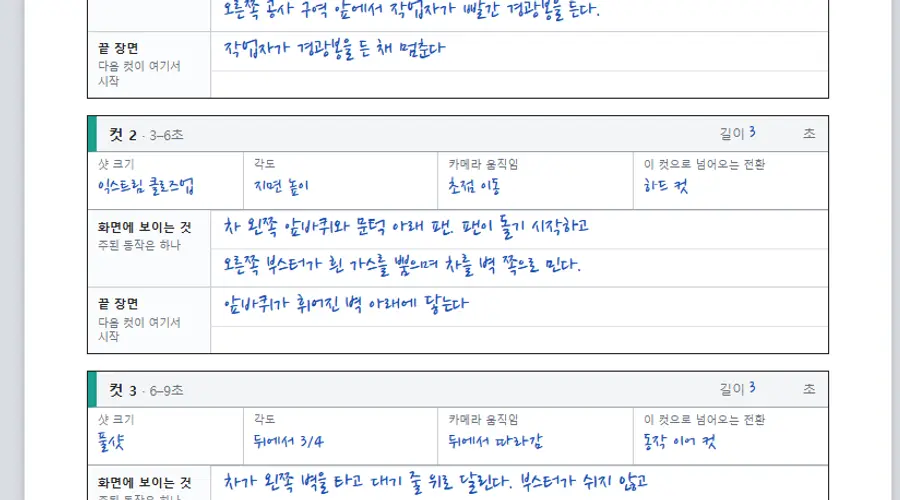
컷 길이를 모두 더한 값이 영상 길이입니다. Higgsfield MCP로 10월 17일 조회한 모델 목록에서 Seedance 2.5의 길이는 4~30초의 정수이고, 해상도는 480p·720p·1080p, 비율은 21:9·16:9·4:3·1:1·3:4·9:16을 고를 수 있습니다. 기획서는 합계가 이 범위를 벗어나면 도구 막대에 길이 경고를 띄우며, 고를 수 있는 화면 비율도 같은 여섯 가지입니다.
카메라 말과 프롬프트에 들어가는 영어
목록에서 한국어 이름을 고르면 영상 프롬프트에는 오른쪽 열의 영어 문구가 들어가며, 표는 기획서 코드의 카메라 사전을 그대로 옮겼습니다. 샷과 렌즈 조합을 제품군별로 고르는 방법은 AI 영상 광고 샷·렌즈 프롬프트 가이드에 따로 정리돼 있습니다.
| 칸 | 기획서에서 고르는 말 | 영상 프롬프트에 들어가는 영어 |
|---|---|---|
| 샷 크기 | 익스트림 와이드 | extreme wide shot |
| 샷 크기 | 와이드 | wide shot |
| 샷 크기 | 풀샷 | full shot showing the whole subject |
| 샷 크기 | 미디엄 | medium shot |
| 샷 크기 | 미디엄 클로즈업 | medium close-up |
| 샷 크기 | 클로즈업 | close-up |
| 샷 크기 | 익스트림 클로즈업 | extreme close-up macro shot |
| 각도 | 드론 부감 | high aerial drone view looking down at an angle |
| 각도 | 탑뷰 (바로 위) | top-down overhead view from directly above |
| 각도 | 하이앵글 | high angle looking down |
| 각도 | 눈높이 정면 | eye-level frontal view |
| 각도 | 눈높이 3/4 | eye-level front three-quarter view |
| 각도 | 측면 | side profile view |
| 각도 | 뒤에서 3/4 | rear three-quarter view from behind |
| 각도 | 로우앵글 | low angle looking up |
| 각도 | 지면 높이 | camera just above the ground surface |
| 각도 | 웜즈아이 (바로 아래) | worm's-eye view looking straight up from below |
| 각도 | 1인칭 시점 | first-person point of view |
| 각도 | 어깨 너머 | over-the-shoulder view |
| 카메라 움직임 | 고정 | locked-off camera with no movement |
| 카메라 움직임 | 천천히 다가감 | slow dolly-in toward the subject |
| 카메라 움직임 | 천천히 물러남 | slow dolly-out away from the subject |
| 카메라 움직임 | 옆으로 따라감 | lateral tracking shot moving alongside the subject at the same speed |
| 카메라 움직임 | 뒤에서 따라감 | follow shot from behind at a constant distance |
| 카메라 움직임 | 주위를 돎 | slow orbit around the subject |
| 카메라 움직임 | 위로 틸트 | tilt up following the subject |
| 카메라 움직임 | 아래로 틸트 | tilt down |
| 카메라 움직임 | 좌우 팬 | smooth horizontal pan |
| 카메라 움직임 | 솟아오름 | crane up, rising vertically |
| 카메라 움직임 | 내려옴 | crane down, descending vertically |
| 카메라 움직임 | 드론 전진 비행 | drone flying forward and slightly descending |
| 카메라 움직임 | 손으로 든 듯 | handheld camera with light natural shake |
| 카메라 움직임 | 천천히 줌인 | slow optical zoom-in |
| 카메라 움직임 | 초점 이동 | static camera with a rack focus from foreground to subject |
| 전환 | 검은 화면에서 시작 | fade in from black |
| 전환 | 하드 컷 | hard cut |
| 전환 | 동작 이어 컷 | cut on action: the motion from the previous shot continues across the cut |
| 전환 | 모양 맞춰 컷 | match cut: the main shape sits in the same screen position as the end of the previous shot |
| 전환 | 휩 팬 | whip-pan transition with a short motion-blur streak |
| 전환 | 가림 전환 | foreground wipe: something passes right in front of the lens and reveals the new shot |
| 전환 | 빛 번쩍 | flash cut through a brief bright light burst |
| 전환 | 소리에 맞춰 컷 | hard cut timed exactly to a sound beat |
| 전환 | 스냅 줌인 | snap zoom punch-in |
| 전환 | 흐림에서 초점 | starts fully out of focus and pulls into sharp focus |
| 전환 | 디졸브 | short cross-dissolve |
| 전환 | 틈 통과 | the camera passes through a gap or opening into the new shot |
예시 세 개의 영상 프롬프트
예시 세 개는 실제로 Seedance 2.5로 만들어 1080p로 확정한 영상의 컷 구성을 기획서 칸으로 옮긴 것입니다. 세 예시 모두 15초이고 컷끼리 겹치는 구도·움직임·전환이 없습니다.
양식이 만드는 영상 프롬프트는 DELIVERY(길이·비율·컷 수), REFERENCES AND LOOK(참조 사진의 역할과 빛), 컷별 SHOT, SOUND, FINAL FRAME, CONTINUITY AND RULES 순서입니다. 아래 코드는 기획서 스크립트를 실행해 얻은 출력을 손대지 않고 옮겼습니다. 자기 광고에 맞출 때는 이 문장을 직접 고치지 않고 기획서 칸을 바꿔 다시 복사하면 컷 사이의 겹침 검사도 함께 거칩니다.
터널 벽 타는 차
막힌 터널에서 흰 2인승 전기차가 왼쪽 벽을 타고 대기 줄을 넘어가는 5컷 광고입니다. 회사 로고와 글자를 넣지 않고 냉가스 분사만 쓰도록 꼭 지킬 것 칸에 적었습니다.
DELIVERY
Create a 15-second 16:9 horizontal photorealistic commercial for a new two-seat electric roadster that can ride a tunnel wall and flip through the air on cold-gas thrusters, filmed like a real live-action ad at 24 fps. 5 shots, each with exactly the camera and transition written below; do not add, merge, or reorder shots. The ad says one thing: even in a blocked tunnel, it never waits.

REFERENCES AND LOOK
@Image1 = the hero, look only: a low, sharply angular white wedge two-seat electric car with black lower sides, a dark glass canopy, a full-width red tail-light bar, flat black wheel covers, and thrust nozzles under the body. Keep it identical in every shot.
@Image2 = the location, place and light only: inside the real Inje-Yangyang Tunnel in South Korea: a two-lane one-way tube; the right lane is closed for maintenance with drums, cones, and a flashing yellow arrow board; a queue of cars waits in the left lane beside the curved left wall. Copy no other object from it.
Light: the continuous white LED strip along the tunnel ceiling as the main light, with the flashing yellow arrow board as the only accent. Mood: tense and realistic, like real test footage, never over-the-top science fiction.

0–3s — SHOT 1
In: fade in from black. Camera: wide shot, eye-level frontal view; slow dolly-in toward the subject.
Action: Behind the queue, looking down the tunnel: the white car waits third in line in the left lane while a worker in a reflective vest raises a red light baton in front of the closed right lane.
Ends: the worker holds the baton up.

3–6s — SHOT 2
In: hard cut. Camera: extreme close-up macro shot, camera just above the ground surface; static camera with a rack focus from foreground to subject.
Action: The left front wheel and the fan vents under the sill: the vents spin up, then the boosters on the right side blast white cold gas toward the tunnel center and shove the car sideways toward the wall.
Ends: the left front wheel touches the base of the curved wall.

6–9s — SHOT 3
In: cut on action: the motion from the previous shot continues across the cut. Camera: full shot showing the whole subject, rear three-quarter view from behind; follow shot from behind at a constant distance.
Action: The car drives up the curved left wall and races forward along it above the queued cars, body tilted about seventy degrees; its boosters keep blasting toward the tunnel center the whole way, leaving a long white vapor trail.
Ends: it reaches the end of the work zone, still on the wall.

9–12s — SHOT 4
In: whip-pan transition with a short motion-blur streak. Camera: medium shot, side profile view; smooth horizontal pan.
Action: A violent cold-gas blast kicks the car off the wall into the middle of the tunnel, where it makes exactly one barrel roll around its long axis, jets shooting at the ceiling while upside down, then lands on all four wheels inside a dense white cloud.
Ends: the car drives out of the cloud, level.

12–15s — SHOT 5
In: flash cut through a brief bright light burst. Camera: wide shot, low angle looking up; locked-off camera with no movement.
Action: Outside the exit portal at road level, looking back into the dark tunnel mouth: the white car comes out toward the camera, grows larger, and passes on the left of frame into daylight.
Ends: only white vapor drifts out of the portal.

SOUND: No dialogue, no music. Tunnel hum and ventilation fans; a rising fan whir; a continuous booster hiss echoing while it rides the wall; a loud high-pressure blast on the kick-off; a heavy whoosh on landing; then open mountain wind outside.

FINAL FRAME: The exit portal set into a forested mountain, seen from outside, with the last white vapor drifting out after the car has passed; the upper third is clean sky for a title added later. Hold it completely still for the last 12 frames.

CONTINUITY AND RULES
Same in every shot: the car's shape, white body and black lower sides; the queue in the left lane and the work zone in the right lane; the car rides the left wall; every car always travels toward the exit.
No logos, badges, text, or subtitles; signs carry only symbols.
The thrusters release only white cold gas, never fire.
The same single car in every shot; no other white sports car.
Each shot has its own framing, camera move, and transition, one primary action, and starts from the previous end state. The camera stops where written. No unrequested cut, speed ramp, shake, zoom, text, or watermark.대전 빵집
튀김기에서 빵을 건지는 매크로 컷으로 시작해 매장 통로와 빵 세 개를 차례로 보여 주는 6컷 광고입니다. 가게 이름·간판·가격표 글자는 화면에 넣지 않습니다.
DELIVERY
Create a 15-second 16:9 horizontal photorealistic commercial for a famous old bakery in Daejeon, South Korea, known for its Twigim Soboro, Bomunsan Meari, and Pantalong Buchu bread, filmed like a real live-action ad at 24 fps. 6 shots, each with exactly the camera and transition written below; do not add, merge, or reorder shots. The ad says one thing: you can almost smell the bread fresh out of the fryer.

REFERENCES AND LOOK
@Image1 = the hero, look only: three breads: Twigim Soboro, a round deep-golden fried bun about 9 cm across with a bumpy streusel crust and dark red-bean paste inside; Bomunsan Meari, a tall dome-shaped laminated pastry with a glossy caramel spiral crust and dozens of thin layers; Pantalong Buchu bread, a shiny round bun packed with green garlic chives and scrambled egg. Keep it identical in every shot.
@Image2 = the location, place and light only: the sales floor of a busy old bakery in Daejeon: long dark wooden display tables full of breads down the middle, an open kitchen with a fryer behind a glass wall on the left, customers holding tongs and trays. Copy no other object from it.
Light: warm tungsten spotlights over the tables as the main light, with cooler white light from the kitchen as fill. Mood: a warm, busy morning bakery with a handmade feel, never cold or sterile.

0–3s — SHOT 1
In: fade in from black. Camera: extreme close-up macro shot, side profile view; locked-off camera with no movement.
Action: One Twigim Soboro floats in bubbling golden fryer oil; tiny bubbles burst around its crust; a metal strainer slides under it and lifts it out.
Ends: the bun rises out of the oil, dripping.

3–5s — SHOT 2
In: match cut: the main shape sits in the same screen position as the end of the previous shot. Camera: medium shot, top-down overhead view from directly above; lateral tracking shot moving alongside the subject at the same speed.
Action: Rows of fresh Twigim Soboro on a cooling rack; a gloved hand places the last hot bun into the only empty gap; steam rises from every bun.
Ends: the grid is complete.

5–8s — SHOT 3
In: whip-pan transition with a short motion-blur streak. Camera: close-up, eye-level frontal view; slow dolly-in toward the subject.
Action: Two hands tear a Twigim Soboro in half; the streusel crust cracks and crumbs fall; the soft white bread stretches open to reveal thick dark red-bean paste and a curl of steam.
Ends: the two halves are held apart, the red-bean paste facing camera.

8–11s — SHOT 4
In: foreground wipe: something passes right in front of the lens and reveals the new shot. Camera: wide shot, eye-level front three-quarter view; follow shot from behind at a constant distance.
Action: After a customer's shoulder crosses the lens, the aisle between the long wooden display tables full of breads; customers pick bread with tongs and a baker carries a fresh tray high above the crowd.
Ends: the camera settles in the middle of the aisle.

11–13s — SHOT 5
In: hard cut timed exactly to a sound beat. Camera: medium close-up, low angle looking up; slow orbit around the subject.
Action: A whole Bomunsan Meari on a wooden board; a long bread knife slices down through it; the glossy crust crackles and the cut face shows dozens of thin spiral layers.
Ends: the camera stops facing the cut layers.

13–15s — SHOT 6
In: short cross-dissolve. Camera: medium shot, high angle looking down; crane up, rising vertically.
Action: On a dark wooden table, a halved Twigim Soboro, a torn-open Pantalong Buchu bread spilling green chive filling, and a sliced Bomunsan Meari sit in a row, steam rising.
Ends: all motion resolves.

SOUND: No dialogue. Sizzling oil; a metal strainer on the fryer; crust cracking; the murmur of a busy bakery and tongs clicking; a knife crunching through flaky layers; a soft warm acoustic guitar melody.

FINAL FRAME: The three breads in a row on a dark wooden table, halved Twigim Soboro on the left, torn Pantalong Buchu bread in the center, sliced Bomunsan Meari on the right, steam rising; the upper third is soft and empty for a title. Hold it completely still for the last 12 frames.

CONTINUITY AND RULES
Same in every shot: the shape, color, and filling of the three breads; the warm light color; the kitchen on the left and the display tables in the middle.
No shop name, signs, logos, or readable price cards anywhere.
Each bread keeps exactly the shape and filling of its reference.
Staff wear white bakery uniforms and white caps.
Each shot has its own framing, camera move, and transition, one primary action, and starts from the previous end state. The camera stops where written. No unrequested cut, speed ramp, shake, zoom, text, or watermark.옷 쇼핑몰
흰 배경 상품 사진처럼 펼쳐 둔 옷 세 벌이 성수동 거리에서 가상 모델의 착장으로 이어지는 6컷 광고입니다. 모델은 실존 인물이 아닌 가상 인물로 적었습니다. 옷의 색·단추·니트 무늬는 모든 컷에서 상품 사진과 같아야 한다는 조건도 넣었습니다.
DELIVERY
Create a 15-second 16:9 horizontal photorealistic commercial for a small Korean online clothing store's new autumn line: a camel wool coat, a cream cable-knit sweater, and light-wash wide-leg jeans, filmed like a real live-action ad at 24 fps. 6 shots, each with exactly the camera and transition written below; do not add, merge, or reorder shots. The ad says one thing: the exact clothes from the product photos come alive on the streets of Seongsu-dong.

REFERENCES AND LOOK
@Image1 = the hero, look only: a fictional Korean woman in her mid-twenties with shoulder-length black hair, wearing a knee-length camel single-breasted wool coat with three dark brown horn buttons worn open over an oversized cream cable-knit sweater, light-wash high-waist wide-leg jeans, and white sneakers. Keep it identical in every shot.
@Image2 = the location, place and light only: Seongsu-dong in Seoul: a narrow street of red-brick storefronts with potted plants, a busy shopping street of low brick buildings, and a small intersection with a red-painted road and a plain white wall. Copy no other object from it.
Light: low warm late-afternoon sun from the west as the main light, with warm light bouncing off the brick walls as fill. Mood: a golden autumn afternoon lookbook with soft film grain, never a flashy runway show.

0–2s — SHOT 1
In: fade in from black. Camera: medium shot, top-down overhead view from directly above; locked-off camera with no movement.
Action: The three garments lie flat on a white table like product photos, sweater on the left, jeans in the center, coat on the right; a gust lifts the camel coat up toward the lens.
Ends: the camel wool fills the whole frame.

2–5s — SHOT 2
In: match cut: the main shape sits in the same screen position as the end of the previous shot. Camera: full shot showing the whole subject, low angle looking up; slow dolly-out away from the subject.
Action: On the red-brick street, the model wearing all three garments walks straight toward the camera on the sidewalk, storefronts on the left; the open coat hem and wide jeans swing with her stride.
Ends: she passes the camera on the right.

5–7s — SHOT 3
In: whip-pan transition with a short motion-blur streak. Camera: extreme close-up macro shot, side profile view; lateral tracking shot moving alongside the subject at the same speed.
Action: Macro across her outfit: the thick cable knit of the sweater, then the high waistband of the jeans, then the camel wool weave and one dark horn button, sunlight grazing the texture.
Ends: the slide stops on the horn button.

7–10s — SHOT 4
In: foreground wipe: something passes right in front of the lens and reveals the new shot. Camera: wide shot, eye-level front three-quarter view; smooth horizontal pan.
Action: From the opposite sidewalk, across the shopping street: the model walks on the far sidewalk from frame right to frame left among pedestrians in dark clothes, standing out by color.
Ends: she stays at frame center as the pan follows her.

10–12s — SHOT 5
In: hard cut timed exactly to a sound beat. Camera: full shot showing the whole subject, camera just above the ground surface; tilt up following the subject.
Action: From just above the red-painted road, the camera tilts up from her white sneakers to her face; she stops and looks back over her left shoulder into the lens.
Ends: her face in the upper third, looking into the lens.

12–15s — SHOT 6
In: short cross-dissolve. Camera: medium shot, eye-level frontal view; slow orbit around the subject.
Action: In front of the plain white wall, she stands with her hands in her coat pockets, framed from the knees up; a light breeze lifts the coat hem and a strand of hair; a small calm smile.
Ends: all motion resolves.

SOUND: No dialogue. Soft lo-fi electric piano and a gentle beat; footsteps on brick; the rustle of wool; distant street murmur.

FINAL FRAME: The model stands on the right third of frame in front of the plain white wall, hands in her coat pockets, framed from the knees up; the left third is clean white wall for a title added later. Hold it completely still for the last 12 frames.

CONTINUITY AND RULES
Same in every shot: the model's face and hair, the three-piece outfit, the direction of the sunlight, and other pedestrians in plain dark clothes.
Each garment keeps exactly the color, buttons, cut, and knit pattern of its product photo.
The model is a fictional person, not a real or famous one, with the same face in every shot.
No logos, shop names, or readable signs.
Each shot has its own framing, camera move, and transition, one primary action, and starts from the previous end state. The camera stops where written. No unrequested cut, speed ramp, shake, zoom, text, or watermark.Higgsfield Ads Studio로 영상 만들기
기획서를 다 채웠으면 도구 막대의 'AI에게 보낼 HTML 저장'을 누릅니다. 광고기획서-광고이름-날짜.html 파일이 내려받아지고, 그 안에 AI에게 주는 영어 지시문, 한국어 기획서 표, 컷별 카메라 선택과 영어 용어, 양식이 만든 영어 초안 네 개가 들어 있습니다.
빈 양식에 한국어로 적은 칸은 복사 버튼으로 만든 프롬프트에도 한국어 그대로 들어갑니다. 영어로 바뀌는 것은 카메라 칸뿐입니다. 저장한 HTML의 지시문은 AI에게 모든 칸을 영어로 옮기고, 양식 초안에 없는 고정 지도(FIXED MAP)와 컷별 카메라 위치·화면 속 위치를 더해 영상 프롬프트 하나로 쓰게 합니다.
You are writing a prompt for the Seedance 2.5 video model from the Korean ad planning sheet below.
Translate everything into natural English and write ONE video prompt with these sections in order: DELIVERY, REFERENCES, FIXED MAP, the timed SHOTs, SOUND, RULES.
DELIVERY: total length, aspect ratio, photorealistic live-action look, 24 fps, the number of shots, and the sentence "Exactly the cameras and transitions written; do not add, merge, or reorder shots."
REFERENCES: one line per reference image (@Image1, @Image2, ...): what it shows and what to copy from it (look only, location only).
FIXED MAP: where everything is and which way things face and move, the same in every shot (left/right side, direction of travel, where the light comes from).
SHOTs: one block per cut, titled "a–bs — SHOT n", with In (the transition), Camera (position, height, direction it looks, movement), Composition (where the subject sits in frame and which way it faces), Motion (one main action, real-world physics), Ends (the end state the next shot starts from).
Keep every cut's shot size, angle, camera move, transition, and length exactly as chosen in the sheet; no two shots may share the same framing, move, or transition.
SOUND and RULES: from the sheet. Hold the final frame still for the last 12 frames. No text, logos, subtitles, or watermark unless the sheet asks for them.
Return only the finished English prompt.
ChatGPT의 Higgsfield 플러그인에서 쓰기
Ad Multiplier 제품 페이지는 ChatGPT에서 chatgpt.com/plugins를 열고 Higgsfield를 검색해 추가한 뒤 Higgsfield 계정으로 로그인하는 순서를 안내합니다. 같은 페이지는 Claude에서도 Higgsfield MCP 서버로 연결할 수 있다고 적고 있습니다.
10월 17일 녹화에서는 ChatGPT에 Higgsfield Ads Studio를 쓰겠다고 입력하자 화면 오른쪽에 Ads Studio가 열렸습니다. 기획서 내용과 실제 사진을 대화창에 넣고 프로모 영상을 만들고 싶다고 요청하자, Ads Studio가 컷 구성과 제작 비용을 먼저 보여 주고 확인을 받은 뒤 영상을 만들었습니다. 이때 바로 고화질로 만들지, 초안을 먼저 볼지 고를 수 있었습니다.
참조 사진: 배경을 지운 사진과 실제 장소 사진
참조 사진은 배경을 지운 제품·인물·소품 사진과 실제로 있는 장소의 사진을 씁니다. 기획서의 영상 프롬프트도 첫 번째 사진은 주인공의 생김새만, 두 번째 사진은 장소와 빛만 가져오라고 역할을 나눠 적습니다.
예시 영상을 만들 때는 컷마다 구도를 확인하려고 만든 장면 이미지를 영상 참조로 함께 넣었다가 결과가 나빠 그 판을 버렸습니다. 그 뒤로 장면 이미지는 프롬프트를 쓰기 전에 구도와 동선을 확인하는 데만 썼습니다. 최종본은 장면 이미지를 빼고 다시 만든 판입니다.
480p 초안으로 먼저 확인하기
Higgsfield MCP 모델 목록에 따르면 Seedance 2.5는 480p 초안을 만든 뒤 7일 안에 같은 작업을 1080p로 확정할 수 있습니다. 기획서 6쪽에도 Generate 버튼의 크레딧을 확인하고 480p로 먼저 본 뒤 해상도를 높이라는 확인 항목이 있습니다.
예시 영상에서는 초안의 컷 구성과 방향을 프레임 단위로 확인하고, 차의 진행 방향이나 인물이 보는 쪽이 틀린 컷은 프롬프트에 위치와 방향을 더 적어 다시 만들었습니다. 영상 비용은 길이와 해상도에 따라 달라지므로 생성 화면에 표시되는 크레딧을 기준으로 판단합니다.
Static Ads와 Ad Multiplier로 광고 늘리기
Higgsfield의 Ads Studio 소개 글에 따르면 Static Ads는 웹사이트 주소를 넣고 Create my brand를 누르면 브랜드 킷을 만들고, 브랜드 이름·로고·색을 직접 넣어 만들 수도 있습니다. 가져온 제품 목록에서 광고할 제품을 고르면 제품당 한 번에 최대 20개의 사진 광고를 만들며, 광고 한 장은 4크레딧이고 총 크레딧은 생성 전에 표시됩니다. 웹사이트 주소는 자기 브랜드나 사용 허락을 받은 브랜드의 것을 넣습니다.
영상 쪽 변형은 Ads Studio 안의 Ad Multiplier가 맡습니다. Ad Multiplier 소개 글은 기존 광고 영상 하나에서 인물, 제품, 옷, 장소, 훅, 스크립트, CTA를 바꾸면서 원래의 움직임, 프레이밍, 컷, 타이밍은 그대로 두는 도구라고 설명합니다. 참조 영상은 4~30초, 이미지는 한 번에 최대 20장, 해상도는 480p·720p·1080p 중에서 고르고, 총 크레딧은 Generate 버튼에 표시됩니다.
기획서 6쪽은 이 변형을 위한 쪽입니다. '바꿀 것' 칸에는 한 가지만 적고, 새 훅과 새 CTA 칸에는 Ad Multiplier에서 훅과 CTA를 바꿀 때 쓸 문구를 적습니다. '3단계 변형' 버튼은 바꿀 것 한 줄과 원본의 카메라 움직임, 컷, 타이밍, 빛, 배경, 소리를 그대로 두라는 문장을 붙여 복사합니다.
6쪽 안내문은 일반 프롬프트와 훅·CTA 바꾸기 중 하나만 켜진다고 적고 있습니다. 이 조건은 10월 17일 Higgsfield 공개 문서에서는 확인하지 못했으므로 실제 화면에서 다시 확인합니다.
제약과 문제 해결
기획서는 프롬프트를 만드는 도구이고, 영상 결과는 생성할 때마다 달라질 수 있습니다. 자주 생기는 상황과 먼저 확인할 것은 다음과 같습니다.
| 증상 | 먼저 확인할 것 |
|---|---|
| 칸이 빨갛게 바뀜 | 쪽 아래 문구에 나온 컷끼리 구도(샷 크기+각도), 카메라 움직임, 전환 중 하나가 같음 |
| 도구 막대에 길이 경고가 뜸 | 쓰는 컷 길이의 합이 4~30초 밖임 |
| 복사한 프롬프트에 [광고할 것] 같은 대괄호가 남음 | 비워 둔 칸의 이름이 자리표시로 들어간 것이며, 복사 버튼에 빈칸 수가 함께 표시됨 |
| 복사 버튼을 눌러도 붙여 넣을 내용이 없음 | 브라우저의 클립보드 권한. 'AI에게 보낼 HTML 저장' 파일에도 같은 초안 네 개가 들어 있음 |
| 영상에 로고나 엉뚱한 글자가 생김 | 꼭 지킬 것 칸의 글자·로고 금지 문장과 참조 사진 속 간판 |
| 컷마다 제품 모양이나 색이 바뀜 | 컷이 바뀌어도 그대로 칸에 모양·색·위치·빛 방향을 적었는지, 참조 사진이 누끼인지 |
예시 세 개의 영상 프롬프트는 4,470~4,739자입니다. Higgsfield 화면에서 Seedance 2.5 프롬프트를 몇 자까지 받는지는 공개 문서에서 확인하지 못했습니다. 붙여 넣은 뒤 끝부분이 잘리지 않았는지 확인합니다.
자주 묻는 질문
아래 답은 10월 17일 공개용 사본을 브라우저와 스크립트로 실행해 확인한 동작입니다. 기획서 코드를 고쳐 쓰면 동작이 달라질 수 있습니다.
빈 양식에 적은 내용은 어디에 저장됩니까?
컷을 6개보다 적게 쓸 수 있습니까?
Seedance 2.5가 아닌 영상 모델에도 쓸 수 있습니까?
인쇄해서 손으로 써도 됩니까?
클로드 × 힉스필드 AI 영상 스킬 3종 가이드: 캐스팅·스토리보드·촬영 지시서
클로드에 힉스필드 MCP와 CLI를 연결해 AI 광고 영상을 만드는 전 과정을 정리했습니다. 인물과 제품을 고정하는 캐스팅 시트, 15초 컷 설계 스토리보드, 시댄스 2.0 프롬프트 변환 촬영 지시서까지 스킬 3종 전문과 실측 통과 프롬프트 3종을 그대로 공개합니다.
힉스필드 캔버스로 광고 영상 자동화 파이프라인 만들기
힉스필드(Higgsfield) 캔버스의 노드 기능을 사용해 트렌드 제품 검색부터 기획, 모델, 제품샷, 영상까지 한 화면에서 광고 영상을 자동으로 뽑아내는 4단계 워크플로우를 처음부터 끝까지 따라 만듭니다.
클로드 오퍼스 4.7 + 힉스필드 Seedance 2.0으로 향수 광고 혼자 만드는 가이드
클로드 오퍼스 4.7의 비주얼 디렉팅 능력과 힉스필드 Marketing Studio, Seedance 2.0을 조합해 가상 향수 브랜드 '누잇(Nuit)' 광고 15초를 기획부터 완성 영상까지 혼자 만드는 전 과정을 정리했습니다. 실제 JSON 프롬프트 3종도 같이 공개합니다.